
Assign Referees and Receive the Official Result From the Field
Referee assignments, connected to the official match record
Assign referees to fixtures, set match fees, and get the official result the moment the referee submits it from the field — the same submission that updates standings, discipline and your public pages. No paper hand-off, no re-keying.
The problem
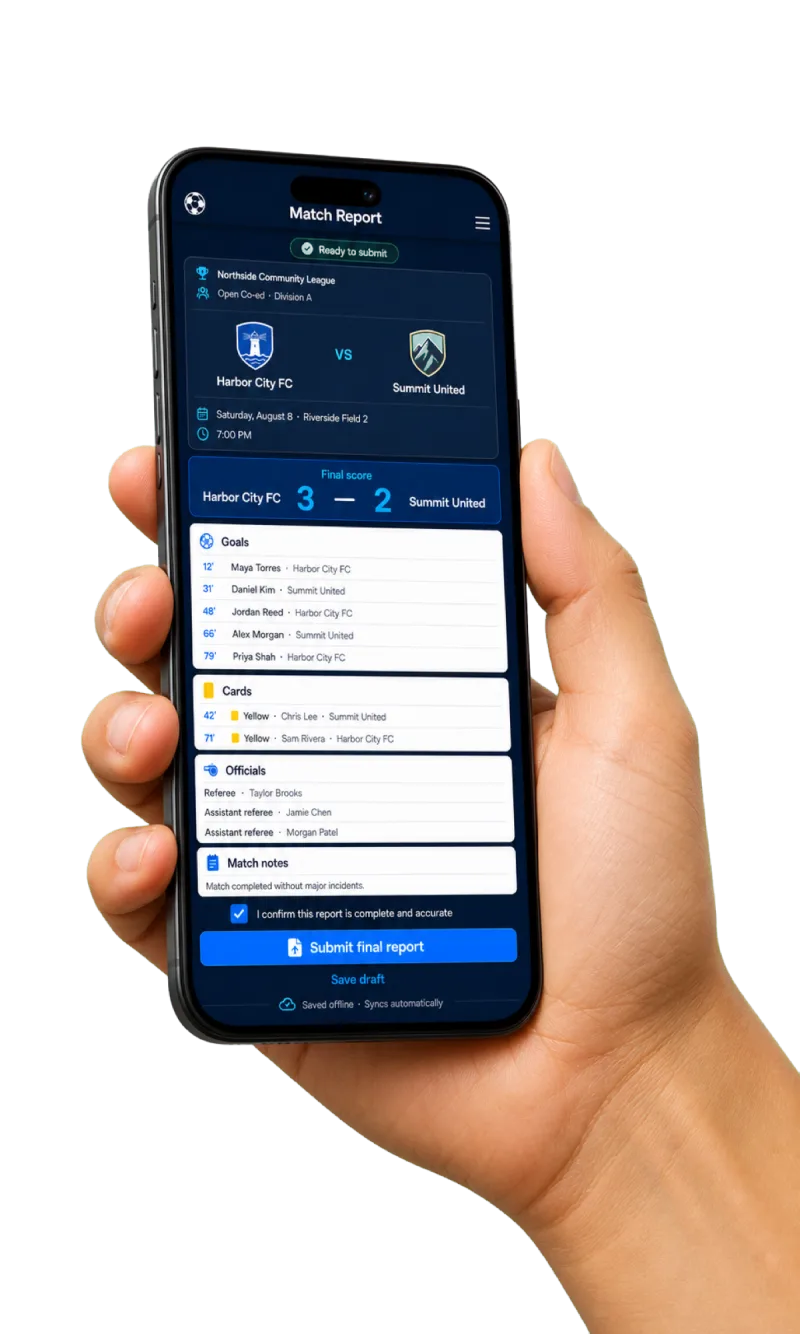
Referee assigning usually lives in a spreadsheet, and the result travels back on paper. Assignments get double-booked, fees are reconciled by hand, and standings wait days for someone to re-type a match card. ZKickoff ties the assignment to the official match record: the referee you assign is the person whose on-field submission becomes the result — captured once, even offline, and everywhere it needs to be once it syncs.
How it works
- 1Assign
Assign a referee to a fixture. They get a one-time magic link scoped to just their games — no password, no app install.
- 2Officiate
The referee runs pre-match checks and captures the game live on mobile — works offline and syncs on reconnect.
- 3Result
On submission the report becomes the official result and flows to standings, cards/discipline and the public match page.
What you get
- ✓ One-click assignment with magic-link (passwordless) entry, scoped to assigned matches
- ✓ Per-role match fees, payout status (pending → approved → paid) and an exportable payout report
- ✓ Mobile, offline-first match reporting with autosave and duplicate-submission protection
- ✓ Cards, second-yellows, red cards and a structured incident/misconduct log
- ✓ Official-result submission that updates standings and discipline; every post-submit amendment is kept in an audit trail
- ✓ Calendar export for the competition, team and each match (ICS)
FAQ
How do referees sign in?
With a one-time magic link — no password and no app to install. The link is scoped to only the matches they’re assigned to.
Can referees accept or decline assignments?
Yes. When you assign a referee, the assignment lands in their portal marked “awaiting response,” and they accept or decline with one tap. A decline re-surfaces that match as needing an official in your console so you can reassign. Referees can also express interest in open games via the opportunities board.
How are match fees handled?
Set per-role rates per competition; ZKickoff computes each official’s fee, tracks payout status, and exports a payout report. (Payout status is tracked in-app; the actual money movement is handled in your payment processor.)
How does the “official result” part work?
The assigned referee’s submission is the authoritative record. Once it syncs, the score, cards and incidents propagate to standings, discipline and the public pages automatically — see the digital referee report.
Available today
- • Assignment creation with passwordless, match-scoped magic-link entry.
- • Per-role match fees, payout status and exportable payout report.
- • Offline-first mobile match reporting; cards, incidents and official-result submission; post-submit amendments with an audit trail.
- • ICS calendar export for competition, team and individual matches, plus a private per-referee feed of their own assignments (subscribe once, stays current).
- • Explicit accept / decline on a direct assignment — declines re-flag the match for reassignment in the console.
- • Referee availability — weekly available days AND specific blackout dates — respected by the assignment suggester, with role-fit, grade/level and lightest-load ranking.
- • A minimum referee grade per competition — the suggester excludes officials below it.
- • Conflict-of-interest declarations — a referee lists teams they won’t officiate, and the suggester keeps them off those games.
- • Assignment reminders — an automatic email + push heads-up the day of / day before each match.
- • Automated replacement — opt in and a declined assignment is auto-filled with the next-best available official (who then accepts/declines), cascading until covered.
Privacy
- • A referee’s private contact details, availability and payout information are never shown on public pages; public referee profiles are opt-in and show only what the referee chooses.
What each role gets
Assign referees, set fees, and get verified results without chasing paper. Payout status and an auditable trail land in the console.
One magic link, only your games, a report pre-filled with both rosters. Capture offline; it syncs when you reconnect; fees are tracked for you.
Ready to run your competition live?
Related:Digital referee reportGuide: how to schedule refereesGuide: paying refereesLeagues & tournamentsPlans & packaging